
How much energy does your code actually consume? And which parts of your application are the biggest energy guzzlers? Oaklean gives you the answers – right in your editor. As an open-source tool, Oaklean helps you analyze and reduce the carbon footprint of your Node.js applications. And best of all: you don’t need to be an energy expert to use it. Here’s how Oaklean works – explained simply for JavaScript and TypeScript developers.
What measures are available for implementing Green IT?
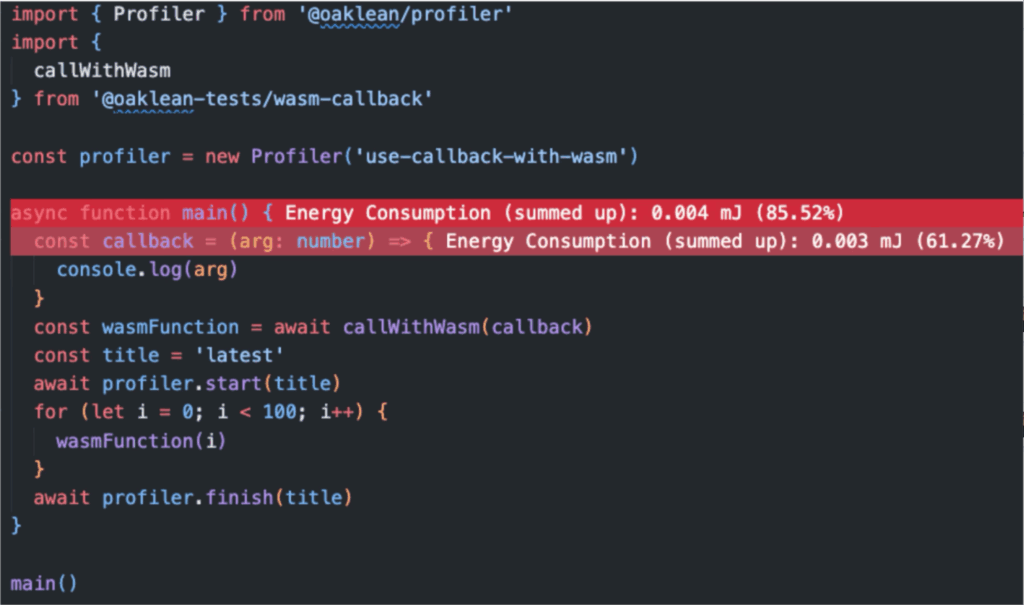
In addition to an efficient infrastructure, lean code, and on-demand scaling, it’s particularly important to make resource consumption transparent. This is exactly where Oaklean comes in: Our tool measures how resource-intensive individual parts of your application are – whether they’re custom functions, external libraries, or Node.js functions. It shows you which code is consuming how much CPU time and energy. The results are displayed directly in Visual Studio Code – clearly organized, color-coded, and at the line level.
How does that work?
Oaklean consists of a set of components necessary to move from code execution to a visualization of energy consumption.
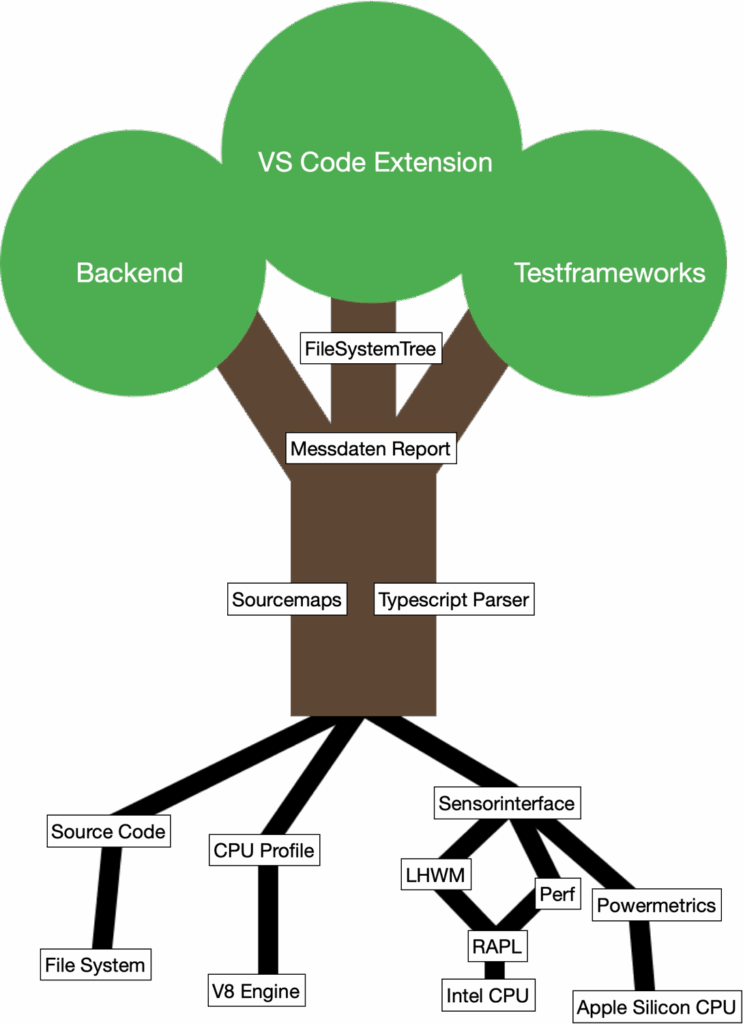
The architecture of Oaklean can be visualized as a tree: from deep roots to a sturdy trunk to the visible leaves with which developers interact directly. Every part of this tree plays a central role in the process of analyzing the energy consumption of Node.js applications.
Roots: Where the data comes from
The system is based on three data sources that serve as the foundation for the analysis:
Source Code: Oaklean accesses the source code, either directly from the file system or via the Node.js engine. The code is parsed and indexed in a context-sensitive manner.
CPU Profiles: Using the V8 JavaScript engine, information is collected on CPU time used and function call behavior. These profiles show which functions were executed, when, and for how long.
Energy Monitoring: Energy consumption data is collected via various energy monitoring interfaces. Depending on the platform, different tools are used, such as perf on Linux, powermetrics on macOS, or LibreHardwareMonitor on Windows. Both system-wide and process-specific metrics are collected.
Stem: Analysis and Classification
This raw data is used to create the actual analysis model in the “stem”:
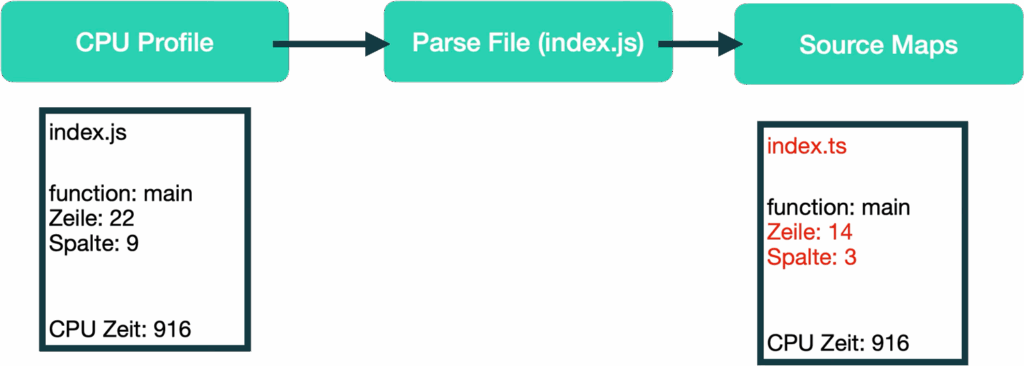
SourceMap Resolving: If the executed code has been transpiled or bundled, SourceMaps help identify the origin of the functions in the original code.
TypeScript Parser: The parser analyzes the structure of the code and assigns context-based identifiers to each function – regardless of any renaming or reordering that occurs during the project.
Measurement Data Model: The measured energy and CPU values are mapped to the corresponding functions in the source code. This results in a precise data model that shows which components consume how much energy and processing time.
Project structure model: This data is also mapped to the project’s folder structure. This allows you to see at a glance which areas – such as src, node_modules, or specific Node.js functions – are particularly resource-intensive.
Leaves: The Developer's Perspective
At the top of the tree structure are the interfaces that developers work with directly:
The VS Code extension displays the results directly in the editor: functions with high energy consumption are highlighted.
A structured graph illustrates the interactions and usage metrics of functions, components, and libraries.
Test frameworks can also be integrated to specifically measure and analyze certain use cases.
From code to energy consumption in the editor
We have now introduced the basic building blocks of Oaklean and described their functions in more detail. But how exactly does it work – and how does it ultimately generate a visualization that highlights energy-intensive sections of code directly within the code editor?
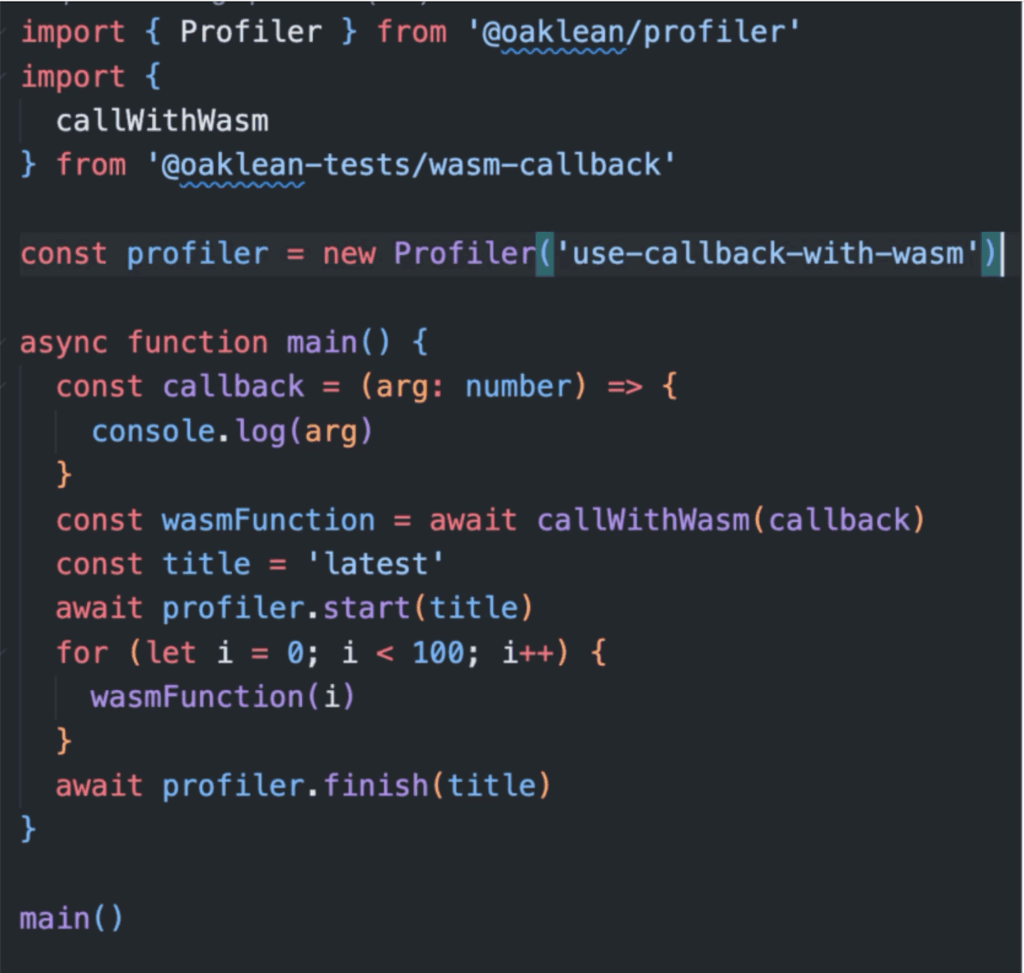

1. Measurement: CPU time and power consumption
When it starts up, Oaklean begins with two parallel measurement processes:
CPU profiling: The V8 engine measures how much processing time individual functions take.
Energy measurement: A SensorInterface tracks the energy consumption of the entire system or the Node.js process. Depending on the operating system, Oaklean uses different tools for this purpose (e.g., powermetrics on macOS or perf on Linux).
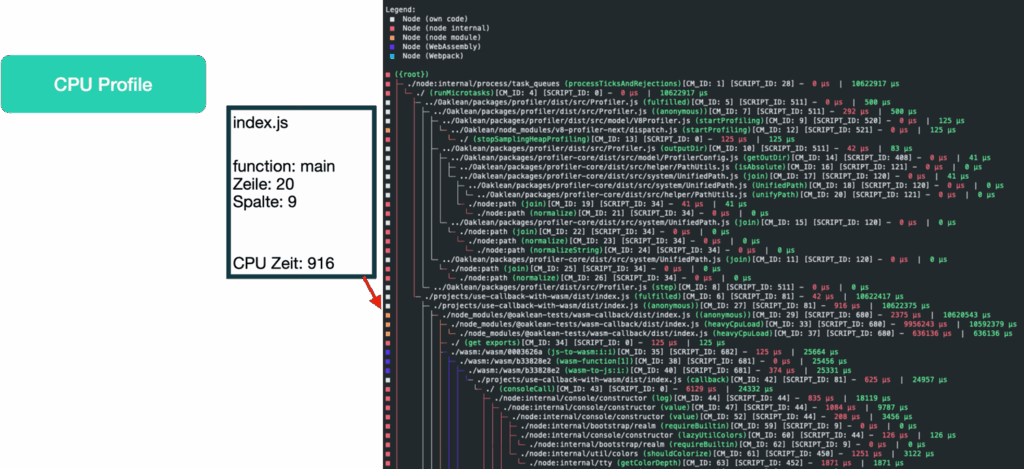
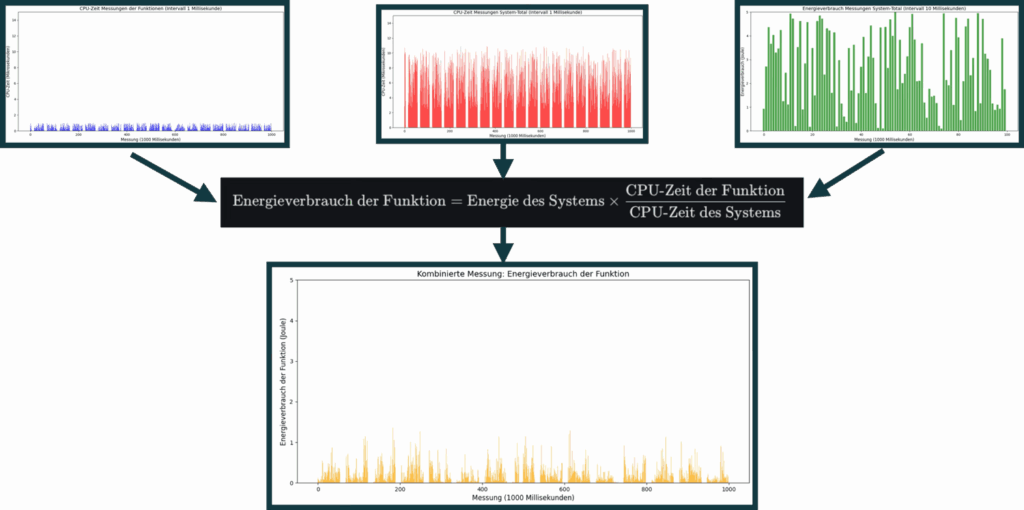
Based on this data, the energy consumption of the individual functions is then estimated. The method used assumes that energy consumption is distributed in proportion to CPU utilization. The formula for determining energy consumption is therefore:

This calculation allows for a highly granular allocation of energy consumption to specific functions without the need for separate direct energy measurements at the functional level.
2. Code Link: From Profile to Source
Once the measurement has stopped, the analysis begins. The executed files are now identified and their source code is parsed:
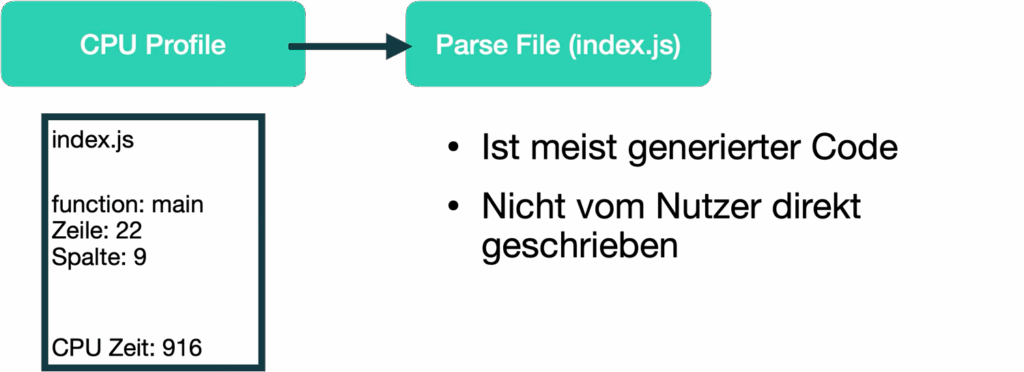
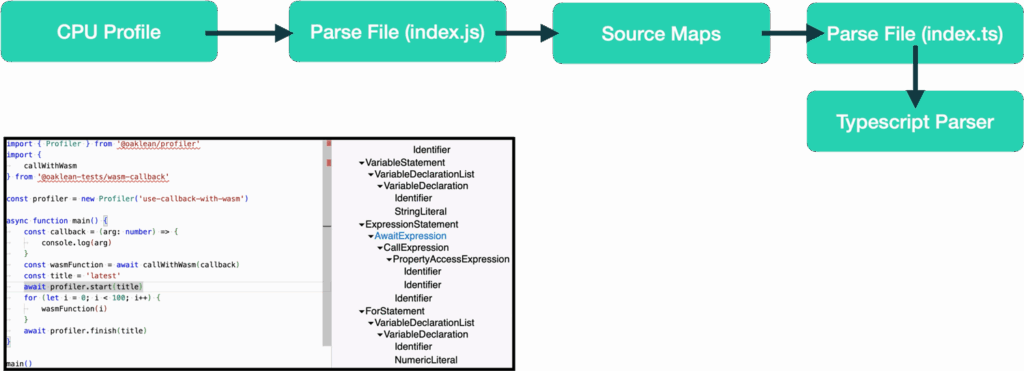
If the analyzed code has been transpiled (e.g., TypeScript → JavaScript), Oaklean uses SourceMaps to map the executed file back to the original source code:
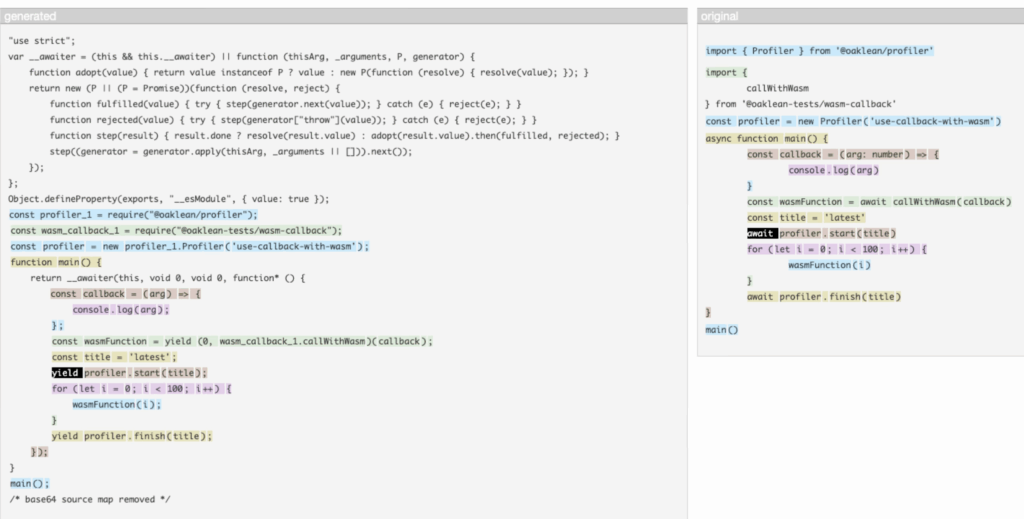
A TypeScript parser analyzes the source code and constructs the abstract syntax tree in order to uniquely identify function definitions:
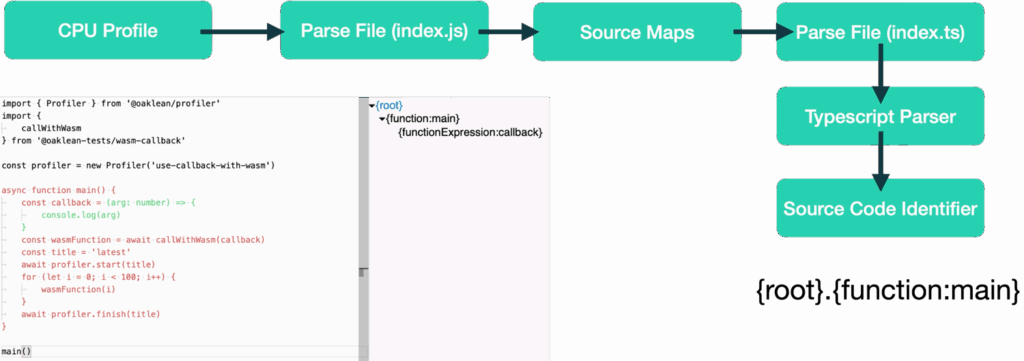
The code is then indexed: Using the abstract syntax tree, new unique, context-based identifiers are assigned to functions to ensure they remain recognizable across versions – even when the code is restructured.
3. Classification: Energy consumption by function
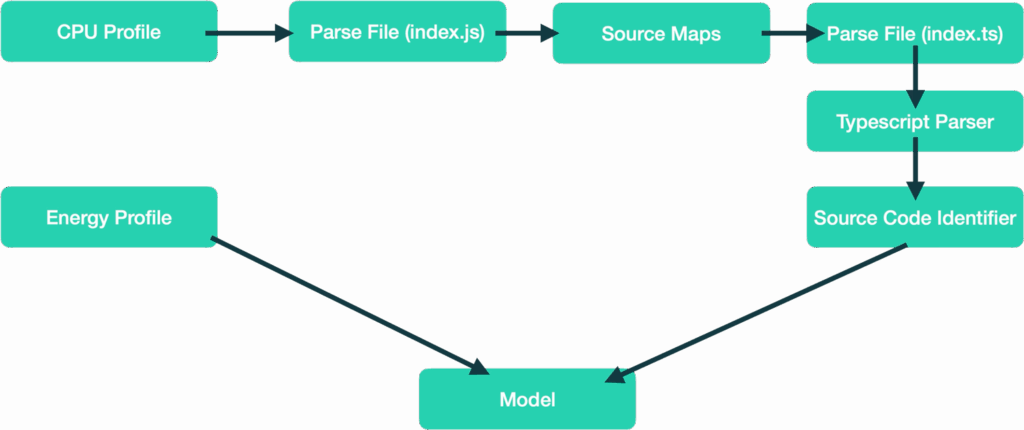
Using all the information collected in the previous steps, the system calculates how much energy each function has consumed. The estimate is based on the ratio of each function’s CPU time to the total CPU time during the measurement interval – multiplied by the measured energy consumption. This results in a precise model that represents the energy consumption of each function
4. Structuring: The SourceFileMetaDataTree Model
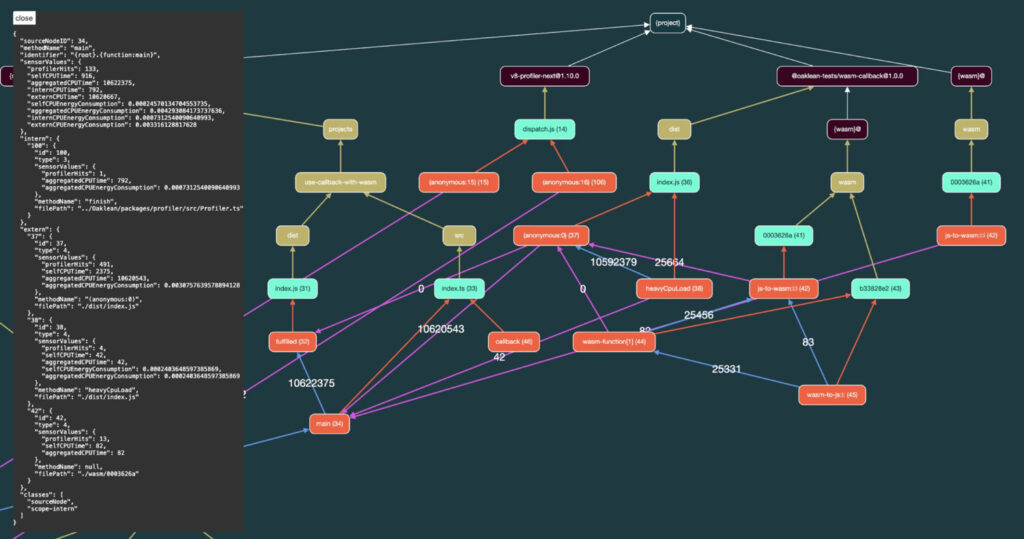
Oaklean organizes the results into a hierarchical model. This model reflects the project structure (files, folders, node_modules, functions) and assigns the metrics to each level as follows:
for personal use
the cumulative consumption of all sub-elements
the use of external components
the use of Node.js internal functions
5. Visualization in VS Code
The data model is ultimately saved in an .oak file. The Oaklean VS Code extension reads this file and displays the results directly in the code editor. Functions with particularly high energy consumption are highlighted – allowing developers to immediately see where optimization is worthwhile.
Green Coding bedeutet: grüner denken, besser coden
Oaklean zeigt, dass nachhaltige Betrachtungen nicht bei der Infrastruktur aufhören – sondern schon im Code beginnen. Indem du verstehst, welche Teile deiner Anwendung besonders energieintensiv sind, entwickelst du ein neues Bewusstsein für die versteckten Auswirkungen von Software. Oaklean hilft dir dabei, diese Transparenz zu schaffen – direkt im Editor, ohne Umwege.