
Anyone using generative AI in production knows the feeling: what starts as a small experiment quickly turns into a noticeable cost item. An agent that automatically processes hundreds of requests, a growing user base, a prompt that gets “just a little” longer, and suddenly the monthly AI budget has to be raised for the third month in a row.
The most common point of contact with AI is the chatbot: a request goes in, a response comes out. Behind it is a large language model (LLM) that doesn’t “know” anything but calculates. Based on the context provided, it computes step by step the probability of the next text fragment, the token.
A token is neither a word nor a character but a small unit of text. As a rough rule of thumb, one token corresponds to about three quarters of an English word. In German, it tends to be somewhat more because words are often longer: 100 words come to roughly 100 to 140 tokens. Exactly how a text is split into tokens, however, depends on the model and its tokenizer. The figure is a guideline, not a fixed constant.
Why this matters: with token-based APIs, costs depend on the number and type of tokens processed. Everything that is input and generated counts and gets billed.
Every request can be broken down into four steps: input (prompt, schema, documents, history) is processed (context plus task) and produces an output (response, possibly reasoning). On top of that come prompt parts the model already knows from a previous call and that are therefore cached: the model doesn’t have to reprocess these cached tokens, so they are billed at a lower rate. This gives the following cost formula:
Input tokens × price + output tokens × price + cached tokens × price = cost per request
Important: with most models, output tokens are significantly more expensive than input tokens, while cached tokens are the cheapest. Reasoning or thinking models also use internal processing steps before they respond, which usually means more output tokens, higher costs and longer response times.
Four levers largely determine the size of the bill:
Model choice: – Would a smaller, cheaper model be enough for this task?
Prompt length – What is actually needed, and what is just ballast?
Output length – How long does the response really need to be?
Number of requests – How often is the request made, especially when automated?
The last point in particular becomes a problem with agents. A single inefficient call barely registers. But if an agent resends the entire history at every step, the inefficiency multiplies with each repetition, and a small sloppiness turns into a real cost item over a thousand runs.
The context window determines how much history, instructions and intermediate results can be sent in a single model call. In multi-step agent workflows, this context grows from call to call, and costs grow with it.
Prompt caching helps reuse recurring parts of a prompt (such as an unchanging system prompt) at lower cost. But caching doesn’t make the history free, only cheaper. The cache is also only valid for a limited time: depending on the provider, it expires after anywhere from a few minutes to several hours of inactivity, and in some cases the duration can be extended for an extra fee. A very long context that is reused many times can still add up noticeably. Four strategies help keep the context lean:
Summarize – compress older content instead of carrying it along in full.
Forget – deliberately remove steps that are no longer relevant from the context.
Split – move subtasks into separate sessions instead of bundling everything into one marathon chat
Limit – set hard caps and stop criteria, especially for automated agent runs.
To make the theory tangible, we built a small reporting tool of our own: it translates natural language into SQL. A question like “How many products have we sold?” generates the matching database query in the background, with no SQL knowledge required from the user.
Our project experience has shown that a tool like this is valuable in practically any mature software project. Ad hoc reports and insights into your own data are worth their weight in gold.
We tested with three freely available open-weight models (gpt-oss-20b, Gemma 4, Nemotron 3 Nano) via Ollama Cloud.
Three effects stood out very clearly:
Every model tokenizes differently. With an identical question and an identical prompt, the number of input tokens varied considerably between models in some cases.
Hidden costs lurk in the technical context. Because the database schema is sent along with every request in the background, unnecessary, unused lines in the schema cost noticeably more tokens, with the same result.
Detailed prompts don’t automatically produce better answers. A precise prompt reduced to bullet points delivered the same correct result as a heavily worded version with a role description, rules written out in full paragraphs and additional examples, just with far fewer tokens.
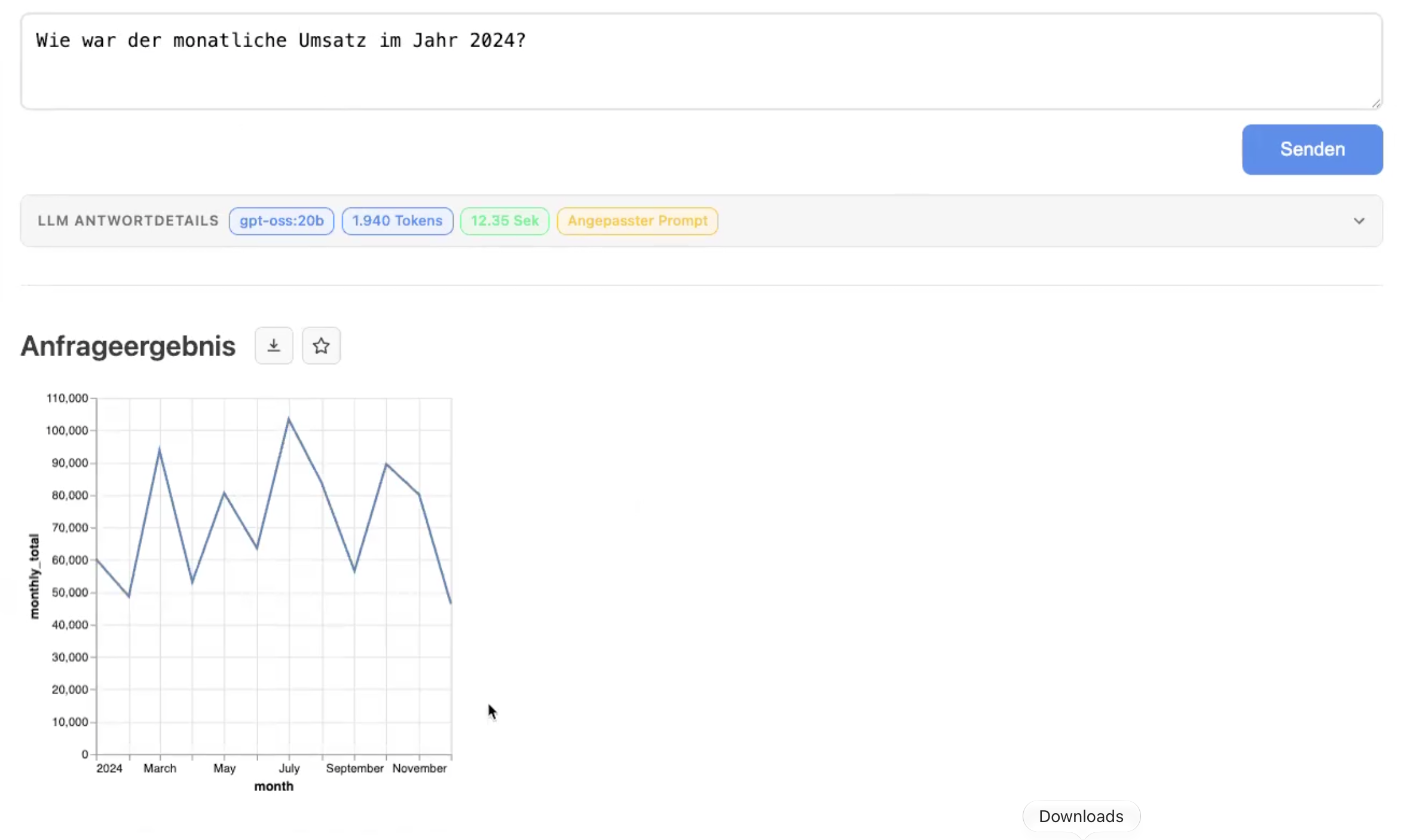
How much this matters in the end is shown by the projection for a realistic usage scenario:
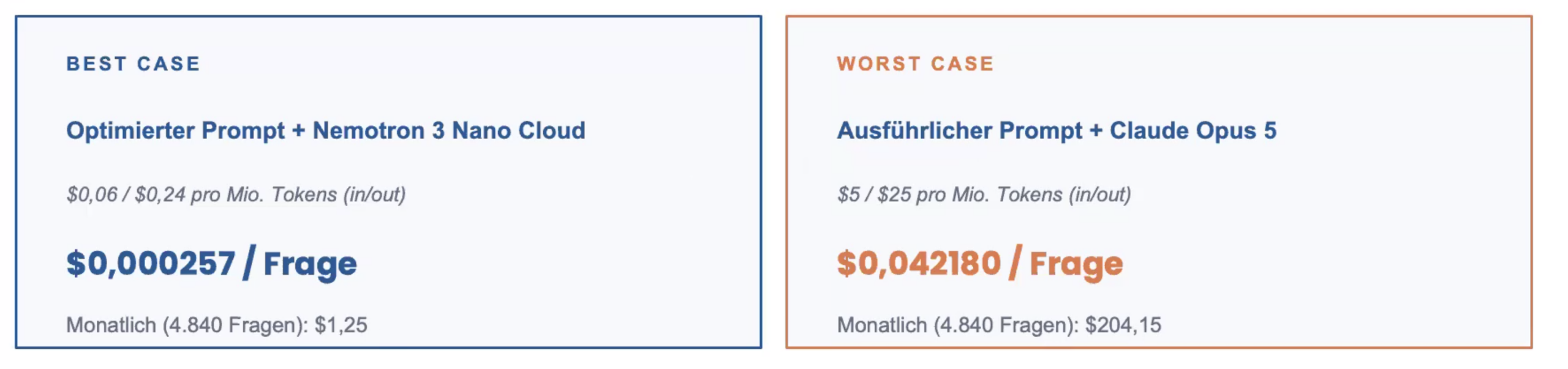
With an identical, correct result, the difference between the two setups is a factor of 164. Monthly costs of $1.25 instead of $204 make a big difference for such a small tool.
The quickest lever isn’t necessarily prompt tuning but often the choice of model. If a task doesn’t really require a frontier model, you save most of the cost through that decision alone.
One point that is often overlooked in practice: it’s not only production that consumes tokens, but automated tests too. Teams that continuously test AI features often run thousands of test cases in a row, and that can add up to a cost item that ends up higher than production itself.
Choose the right model – not the most powerful one, but the one that’s sufficient for the task.
Deliberately limit output – clear format requirements (length, structure) save on the most expensive token category.
Keep prompts precise – examples in the prompt need to be relevant too, otherwise they’re just ballast.
Actively manage context – compress, forget, split, limit.
Measure costs continuously – models, prices and your own usage patterns change quickly.
If you want to keep a systematic eye on your AI costs, you don’t have to start from scratch:
ccusage – a free, open-source command-line tool that analyzes the token usage of supported coding agent CLIs by day, month or session.
Langfuse – an open-source observability platform (also self-hostable) for tracking token usage and costs across multi-step agent workflows.
Helicone – ongoing monitoring across a large number of models and providers.
LiteLLM / Bifrost – gateways that automatically route to the right model and technically enforce defined budgets.
Sometimes it’s also worth building a small dashboard of your own, tailored to the specific use case, just like in our real-world test.
AI costs aren’t a fixed subscription but the result of many small decisions: which model, how long the prompt, how concise the output, how cleanly the context is managed. None of these levers is dramatic on its own. But taken together, and especially with agents running thousands of automated iterations, they decide whether an AI application costs a few dollars or several hundred dollars a month. If you factor tokens in from the start and measure your costs regularly, you stay in control, even as models and prices in the AI market keep changing rapidly.
Questions about token optimization in your own AI applications, or interested in a custom cost analysis? Get in touch with us.